> ## Documentation Index
> Fetch the complete documentation index at: https://docs-staging-feat-acl-curated-blocklist.mintlify.site/llms.txt
> Use this file to discover all available pages before exploring further.

> Learn how to configure an update policy form using Forms for Actions for users to review and accept new terms of service or consent updates.

# Use Cases: Configure an update policy form using Forms

<Card title="Before you start">
  1. Create a [Machine-to-Machine Application](/docs/get-started/auth0-overview/create-applications/machine-to-machine-apps) with the following scopes enabled:

  * `read:users`
  * `update:users`
  * `create:users`
  * `read:users_app_metadata`
  * `update:users_app_metadata`
  * `create:users_app_metadata`

  2. Add a [Vault connection](/docs/customize/forms/vault) using the M2M application credentials.
</Card>

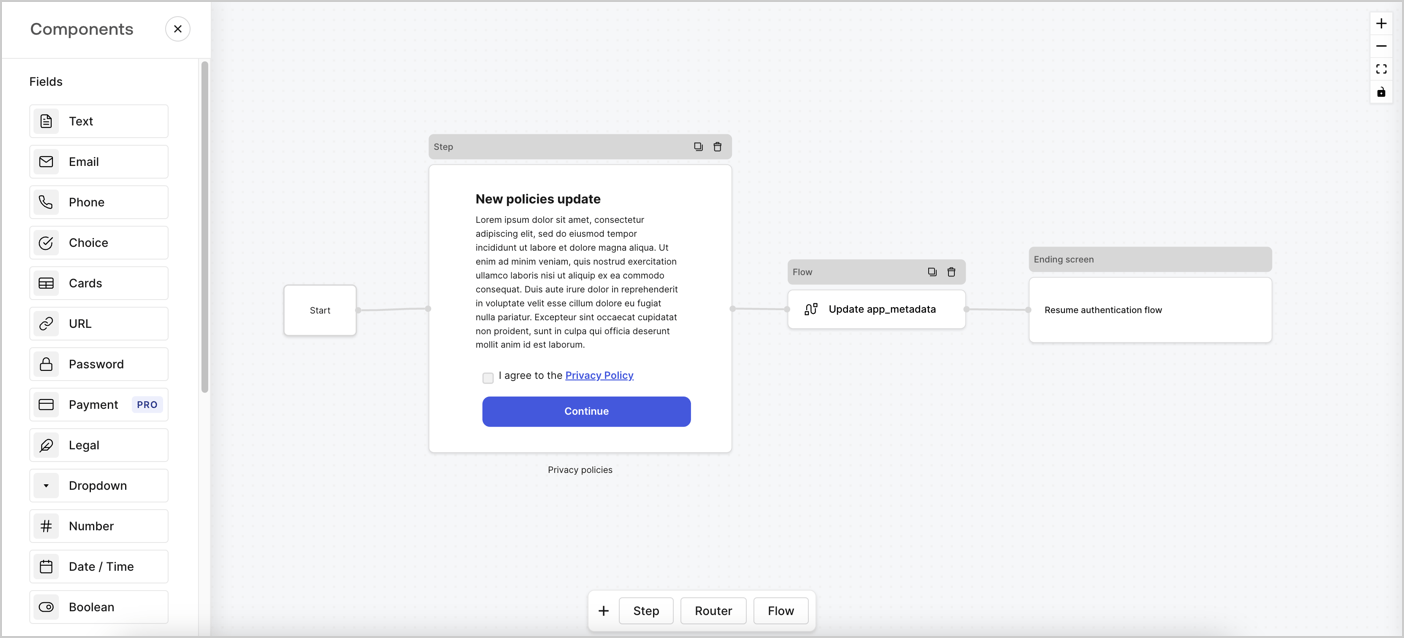
Forms for Actions allows you to create custom privacy policies flows and store the consent under the `app_metadata` object.
<Frame>
  <img src="https://mintcdn.com/docs-staging-feat-acl-curated-blocklist/gcAOlUMCkFr7GR8N/docs/images/cdy7uua7fh8z/6i68dMvHDTijfRmSgN1x8Q/ad900e7d4c0fb34645921435472b8684/privavy-policy-form.png?fit=max&auto=format&n=gcAOlUMCkFr7GR8N&q=85&s=350342834fc157f901cc7cfd18c58409" alt="Dashboard > Actions > Forms > Privacy policy use case" data-og-width="1404" width="1404" data-og-height="638" height="638" data-path="docs/images/cdy7uua7fh8z/6i68dMvHDTijfRmSgN1x8Q/ad900e7d4c0fb34645921435472b8684/privavy-policy-form.png" data-optimize="true" data-opv="3" srcset="https://mintcdn.com/docs-staging-feat-acl-curated-blocklist/gcAOlUMCkFr7GR8N/docs/images/cdy7uua7fh8z/6i68dMvHDTijfRmSgN1x8Q/ad900e7d4c0fb34645921435472b8684/privavy-policy-form.png?w=280&fit=max&auto=format&n=gcAOlUMCkFr7GR8N&q=85&s=3f357bc74726e8eaf983427fbbd4f37f 280w, https://mintcdn.com/docs-staging-feat-acl-curated-blocklist/gcAOlUMCkFr7GR8N/docs/images/cdy7uua7fh8z/6i68dMvHDTijfRmSgN1x8Q/ad900e7d4c0fb34645921435472b8684/privavy-policy-form.png?w=560&fit=max&auto=format&n=gcAOlUMCkFr7GR8N&q=85&s=5e38d96ca3e17796e9763877c9da656f 560w, https://mintcdn.com/docs-staging-feat-acl-curated-blocklist/gcAOlUMCkFr7GR8N/docs/images/cdy7uua7fh8z/6i68dMvHDTijfRmSgN1x8Q/ad900e7d4c0fb34645921435472b8684/privavy-policy-form.png?w=840&fit=max&auto=format&n=gcAOlUMCkFr7GR8N&q=85&s=9f1f01a8d4b76e9fce71ea31408b46d9 840w, https://mintcdn.com/docs-staging-feat-acl-curated-blocklist/gcAOlUMCkFr7GR8N/docs/images/cdy7uua7fh8z/6i68dMvHDTijfRmSgN1x8Q/ad900e7d4c0fb34645921435472b8684/privavy-policy-form.png?w=1100&fit=max&auto=format&n=gcAOlUMCkFr7GR8N&q=85&s=c092c0e17708da7ce240d03200dc991e 1100w, https://mintcdn.com/docs-staging-feat-acl-curated-blocklist/gcAOlUMCkFr7GR8N/docs/images/cdy7uua7fh8z/6i68dMvHDTijfRmSgN1x8Q/ad900e7d4c0fb34645921435472b8684/privavy-policy-form.png?w=1650&fit=max&auto=format&n=gcAOlUMCkFr7GR8N&q=85&s=ddcb9d6a4691e011cb34839238ca299d 1650w, https://mintcdn.com/docs-staging-feat-acl-curated-blocklist/gcAOlUMCkFr7GR8N/docs/images/cdy7uua7fh8z/6i68dMvHDTijfRmSgN1x8Q/ad900e7d4c0fb34645921435472b8684/privavy-policy-form.png?w=2500&fit=max&auto=format&n=gcAOlUMCkFr7GR8N&q=85&s=dd84304642f29c452ec04545e02b76fb 2500w" />
</Frame>

The sections below outline how you can create an Update Policy form using nodes and flows, along with steps for adding your form to a [Post Login](/docs/customize/actions/explore-triggers/signup-and-login-triggers/login-trigger) Action.

## Create a form from scratch

Follow these steps to create a form to gather information:

1. Open the Form editor by selecting **Auth0 Dashboard > Actions > Forms.**
2. Select **Create Form** > **Start from scratch**.

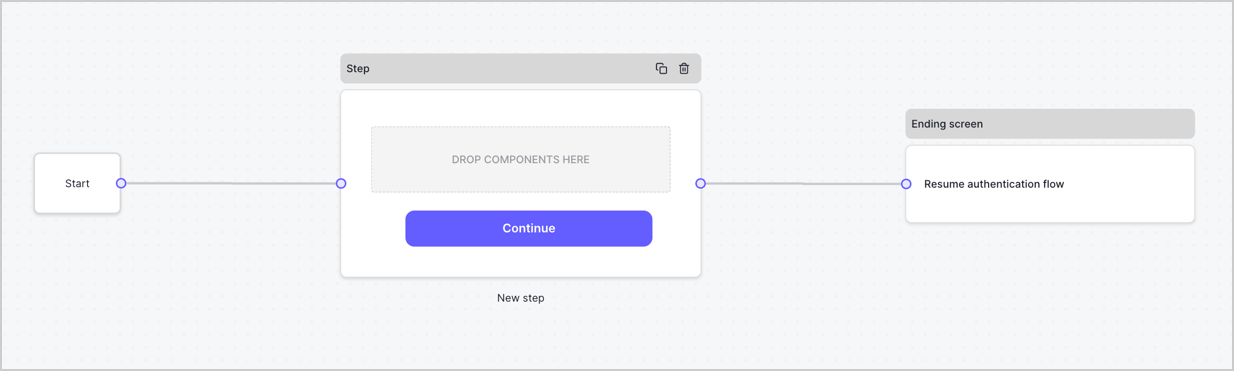
By default, a new form contains a Start node, a Step node, and an Ending screen node.
<Frame>
  <img src="https://mintcdn.com/docs-staging-feat-acl-curated-blocklist/-2zFYUDLaaIZE00n/docs/images/cdy7uua7fh8z/2TZ9jSjgEcARFpULI6hz4R/a4319a1bd482f2ee5cc23100fdb2f42c/New-form-Forms-for-action-use-case.png?fit=max&auto=format&n=-2zFYUDLaaIZE00n&q=85&s=fe679102dee4f86cd160797e4bee2e66" alt="Dashboard > Forms > Use Cases > Form" data-og-width="1234" width="1234" data-og-height="371" height="371" data-path="docs/images/cdy7uua7fh8z/2TZ9jSjgEcARFpULI6hz4R/a4319a1bd482f2ee5cc23100fdb2f42c/New-form-Forms-for-action-use-case.png" data-optimize="true" data-opv="3" srcset="https://mintcdn.com/docs-staging-feat-acl-curated-blocklist/-2zFYUDLaaIZE00n/docs/images/cdy7uua7fh8z/2TZ9jSjgEcARFpULI6hz4R/a4319a1bd482f2ee5cc23100fdb2f42c/New-form-Forms-for-action-use-case.png?w=280&fit=max&auto=format&n=-2zFYUDLaaIZE00n&q=85&s=464747cffd4d1cc82c39932e7e4d9048 280w, https://mintcdn.com/docs-staging-feat-acl-curated-blocklist/-2zFYUDLaaIZE00n/docs/images/cdy7uua7fh8z/2TZ9jSjgEcARFpULI6hz4R/a4319a1bd482f2ee5cc23100fdb2f42c/New-form-Forms-for-action-use-case.png?w=560&fit=max&auto=format&n=-2zFYUDLaaIZE00n&q=85&s=48bb06c71455649dd92f4f4e2364fbf9 560w, https://mintcdn.com/docs-staging-feat-acl-curated-blocklist/-2zFYUDLaaIZE00n/docs/images/cdy7uua7fh8z/2TZ9jSjgEcARFpULI6hz4R/a4319a1bd482f2ee5cc23100fdb2f42c/New-form-Forms-for-action-use-case.png?w=840&fit=max&auto=format&n=-2zFYUDLaaIZE00n&q=85&s=0588bb2090d392b3089ca1b02111c618 840w, https://mintcdn.com/docs-staging-feat-acl-curated-blocklist/-2zFYUDLaaIZE00n/docs/images/cdy7uua7fh8z/2TZ9jSjgEcARFpULI6hz4R/a4319a1bd482f2ee5cc23100fdb2f42c/New-form-Forms-for-action-use-case.png?w=1100&fit=max&auto=format&n=-2zFYUDLaaIZE00n&q=85&s=8b02ed2d9bc3ca1106205b23d1a152d7 1100w, https://mintcdn.com/docs-staging-feat-acl-curated-blocklist/-2zFYUDLaaIZE00n/docs/images/cdy7uua7fh8z/2TZ9jSjgEcARFpULI6hz4R/a4319a1bd482f2ee5cc23100fdb2f42c/New-form-Forms-for-action-use-case.png?w=1650&fit=max&auto=format&n=-2zFYUDLaaIZE00n&q=85&s=674b17c9ca00f09377d167784f16d4ba 1650w, https://mintcdn.com/docs-staging-feat-acl-curated-blocklist/-2zFYUDLaaIZE00n/docs/images/cdy7uua7fh8z/2TZ9jSjgEcARFpULI6hz4R/a4319a1bd482f2ee5cc23100fdb2f42c/New-form-Forms-for-action-use-case.png?w=2500&fit=max&auto=format&n=-2zFYUDLaaIZE00n&q=85&s=e94d0ed502e0b1d599ff4d63b7543573 2500w" />
</Frame>

### Configure the Step node

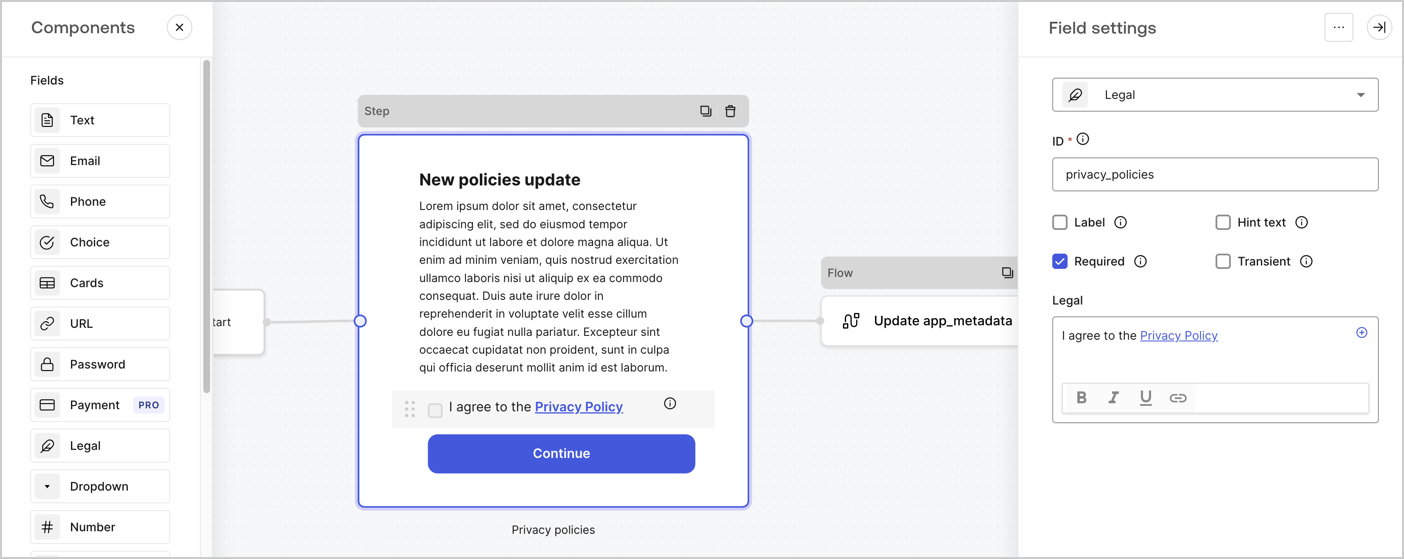
The Step node is the graphical interface visible to users. Add [Fields](/docs/customize/forms/nodes-and-components) to the Step node to collect the new agreement acceptance value by following these steps:

1. Drag a **Rich text** field from the **Components menu** into the **Step** node.

   * **Rich text**: Enter a description of your privacy policies updates.
   * Select **Save**.
2. Drag a **Legal** field into the **Step** node.

   * **ID**: Enter `privacy_policies`.
   * **Required**: Enable the checkbox.
   * **Legal**: Enter `I agree to the Privacy Policy`.
   * Select **Save**.
3. Select **Publish** to save.
<Frame>
  <img src="https://mintcdn.com/docs-staging-feat-acl-curated-blocklist/yG2SoLQkcIwSgMm5/docs/images/cdy7uua7fh8z/59zFFjQjAnjogkc2QGIqqJ/0ad66b1b636544122aa4e65968b76c2c/privacy-policy-step-node.png?fit=max&auto=format&n=yG2SoLQkcIwSgMm5&q=85&s=a3029b1b3ac4fc6ec37949f631ca6fd3" alt="Dashboard > Actions > Forms > Use case privacy policy step node" data-og-width="1404" width="1404" data-og-height="559" height="559" data-path="docs/images/cdy7uua7fh8z/59zFFjQjAnjogkc2QGIqqJ/0ad66b1b636544122aa4e65968b76c2c/privacy-policy-step-node.png" data-optimize="true" data-opv="3" srcset="https://mintcdn.com/docs-staging-feat-acl-curated-blocklist/yG2SoLQkcIwSgMm5/docs/images/cdy7uua7fh8z/59zFFjQjAnjogkc2QGIqqJ/0ad66b1b636544122aa4e65968b76c2c/privacy-policy-step-node.png?w=280&fit=max&auto=format&n=yG2SoLQkcIwSgMm5&q=85&s=7ac16891b6379dba8b866d9655251471 280w, https://mintcdn.com/docs-staging-feat-acl-curated-blocklist/yG2SoLQkcIwSgMm5/docs/images/cdy7uua7fh8z/59zFFjQjAnjogkc2QGIqqJ/0ad66b1b636544122aa4e65968b76c2c/privacy-policy-step-node.png?w=560&fit=max&auto=format&n=yG2SoLQkcIwSgMm5&q=85&s=7c15f88149136c90c76d64a6a14cdf01 560w, https://mintcdn.com/docs-staging-feat-acl-curated-blocklist/yG2SoLQkcIwSgMm5/docs/images/cdy7uua7fh8z/59zFFjQjAnjogkc2QGIqqJ/0ad66b1b636544122aa4e65968b76c2c/privacy-policy-step-node.png?w=840&fit=max&auto=format&n=yG2SoLQkcIwSgMm5&q=85&s=173e1eb937bcd2edd26b5b4a6c576e28 840w, https://mintcdn.com/docs-staging-feat-acl-curated-blocklist/yG2SoLQkcIwSgMm5/docs/images/cdy7uua7fh8z/59zFFjQjAnjogkc2QGIqqJ/0ad66b1b636544122aa4e65968b76c2c/privacy-policy-step-node.png?w=1100&fit=max&auto=format&n=yG2SoLQkcIwSgMm5&q=85&s=24d168b983247d0767dee64136de2086 1100w, https://mintcdn.com/docs-staging-feat-acl-curated-blocklist/yG2SoLQkcIwSgMm5/docs/images/cdy7uua7fh8z/59zFFjQjAnjogkc2QGIqqJ/0ad66b1b636544122aa4e65968b76c2c/privacy-policy-step-node.png?w=1650&fit=max&auto=format&n=yG2SoLQkcIwSgMm5&q=85&s=23cedbdfb8af6d7a63d74a529ebf56f1 1650w, https://mintcdn.com/docs-staging-feat-acl-curated-blocklist/yG2SoLQkcIwSgMm5/docs/images/cdy7uua7fh8z/59zFFjQjAnjogkc2QGIqqJ/0ad66b1b636544122aa4e65968b76c2c/privacy-policy-step-node.png?w=2500&fit=max&auto=format&n=yG2SoLQkcIwSgMm5&q=85&s=8619e2de7ac41a52affb075446e7be03 2500w" />
</Frame>

### Configure the Flow node

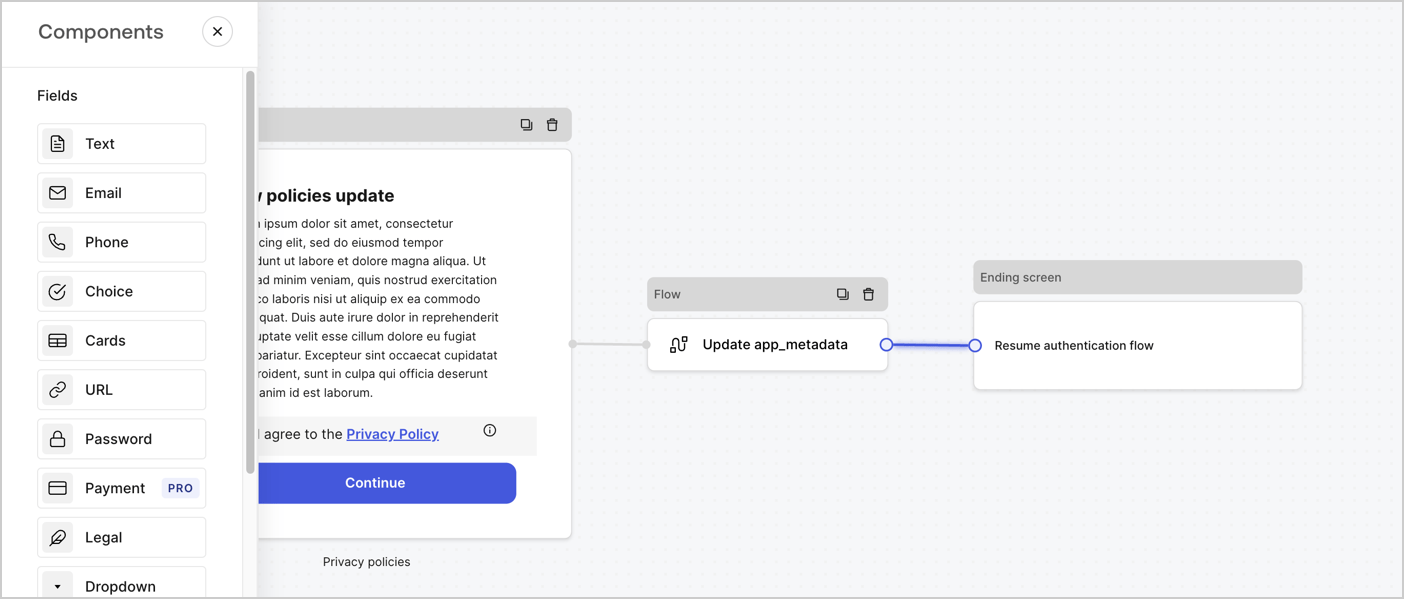
Add a **Flow** node after the **Step** node to update the `app_metadata` and resume the authentication flow by following these steps:

1. Select **Flow** from the bottom of the Form editor.
2. Remove the existing link between the **Step** and **Ending Screen** nodes.
3. Select the new **Flow** > **Click to add a flow** > **Create a new flow.**

   * Enter `Update app_metadata` in the **Name** field.
   * Select **Create**.
   * Select **Save**.
4. Link the **Flow** node to the **Step** and **Ending Screen** nodes as pictured below.
5. Select **Publish** to save.
<Frame>
  <img src="https://mintcdn.com/docs-staging-feat-acl-curated-blocklist/gcAOlUMCkFr7GR8N/docs/images/cdy7uua7fh8z/6YIkzm7SrpM9LW76AXuRzh/353c518fe82bbaa440836da1d83596d6/link-policies.png?fit=max&auto=format&n=gcAOlUMCkFr7GR8N&q=85&s=f761753c5c95577e9d61287b5c977390" alt="Dashboard > Actions > Forms > Form" data-og-width="1404" width="1404" data-og-height="599" height="599" data-path="docs/images/cdy7uua7fh8z/6YIkzm7SrpM9LW76AXuRzh/353c518fe82bbaa440836da1d83596d6/link-policies.png" data-optimize="true" data-opv="3" srcset="https://mintcdn.com/docs-staging-feat-acl-curated-blocklist/gcAOlUMCkFr7GR8N/docs/images/cdy7uua7fh8z/6YIkzm7SrpM9LW76AXuRzh/353c518fe82bbaa440836da1d83596d6/link-policies.png?w=280&fit=max&auto=format&n=gcAOlUMCkFr7GR8N&q=85&s=f75b2438419eed9ac3a8b5a9ec63bdee 280w, https://mintcdn.com/docs-staging-feat-acl-curated-blocklist/gcAOlUMCkFr7GR8N/docs/images/cdy7uua7fh8z/6YIkzm7SrpM9LW76AXuRzh/353c518fe82bbaa440836da1d83596d6/link-policies.png?w=560&fit=max&auto=format&n=gcAOlUMCkFr7GR8N&q=85&s=2c49573fe5241d3dee877992016c1b9a 560w, https://mintcdn.com/docs-staging-feat-acl-curated-blocklist/gcAOlUMCkFr7GR8N/docs/images/cdy7uua7fh8z/6YIkzm7SrpM9LW76AXuRzh/353c518fe82bbaa440836da1d83596d6/link-policies.png?w=840&fit=max&auto=format&n=gcAOlUMCkFr7GR8N&q=85&s=c165ddad805837cde215d47afc6106c0 840w, https://mintcdn.com/docs-staging-feat-acl-curated-blocklist/gcAOlUMCkFr7GR8N/docs/images/cdy7uua7fh8z/6YIkzm7SrpM9LW76AXuRzh/353c518fe82bbaa440836da1d83596d6/link-policies.png?w=1100&fit=max&auto=format&n=gcAOlUMCkFr7GR8N&q=85&s=58f58648ed5c35a95a1229a3af282e73 1100w, https://mintcdn.com/docs-staging-feat-acl-curated-blocklist/gcAOlUMCkFr7GR8N/docs/images/cdy7uua7fh8z/6YIkzm7SrpM9LW76AXuRzh/353c518fe82bbaa440836da1d83596d6/link-policies.png?w=1650&fit=max&auto=format&n=gcAOlUMCkFr7GR8N&q=85&s=eab2ef177ce807ab5e5db6a275164ce5 1650w, https://mintcdn.com/docs-staging-feat-acl-curated-blocklist/gcAOlUMCkFr7GR8N/docs/images/cdy7uua7fh8z/6YIkzm7SrpM9LW76AXuRzh/353c518fe82bbaa440836da1d83596d6/link-policies.png?w=2500&fit=max&auto=format&n=gcAOlUMCkFr7GR8N&q=85&s=6458f047d41313210dc9fb7b92fddfa8 2500w" />
</Frame>

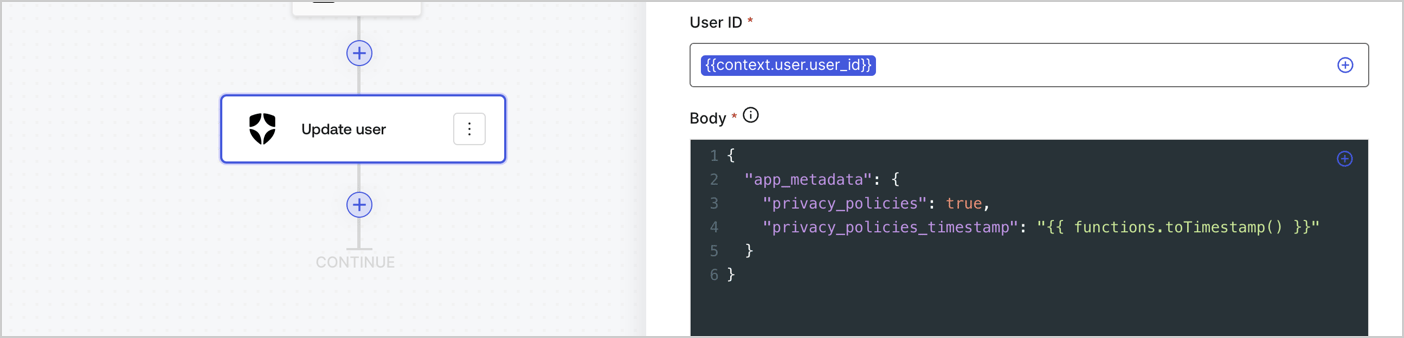
Add an Auth0 Update user action to the flow by following these steps:

1. Select the **Flow** **Update app\_metadata** > **Edit flow** to open the Flow editor in a new tab.
2. Below the StartAction, select the **+** icon to add an **Update user** action. Complete the fields below, then select **Save** to continue.

   * **Connection**: Select from the dropdown the Vault connection to your M2M application.

   * **User ID**: Enter `{{context.user.user_id}}`.

   * **Body**: Copy and paste the following code to update the app\_metadata with the privacy\_policies and privacy\_policies\_timestamp properties.

     ```text lines theme={null}
     {
       "app_metadata": {
         "privacy_policies": true,
         "privacy_policies_timestamp": "{{ functions.toTimestamp() }}"
       }
     }
     ```

   * Select **Save**.
3. Select **Publish** to save.
<Frame>
  <img src="https://mintcdn.com/docs-staging-feat-acl-curated-blocklist/LHta7jo-6etdUcH8/docs/images/cdy7uua7fh8z/CvMNIwWrOUwaFW4X3G28p/1fb70ae57a20749d9ffaaba8dc0b7e26/update-user-privacy.png?fit=max&auto=format&n=LHta7jo-6etdUcH8&q=85&s=f92aed9a6feff362e7687656c2eba362" alt="Dashboard > Actions > Forms > User case privacy policy code" data-og-width="1404" width="1404" data-og-height="338" height="338" data-path="docs/images/cdy7uua7fh8z/CvMNIwWrOUwaFW4X3G28p/1fb70ae57a20749d9ffaaba8dc0b7e26/update-user-privacy.png" data-optimize="true" data-opv="3" srcset="https://mintcdn.com/docs-staging-feat-acl-curated-blocklist/LHta7jo-6etdUcH8/docs/images/cdy7uua7fh8z/CvMNIwWrOUwaFW4X3G28p/1fb70ae57a20749d9ffaaba8dc0b7e26/update-user-privacy.png?w=280&fit=max&auto=format&n=LHta7jo-6etdUcH8&q=85&s=34500fb94080284991646898a7c4cdc3 280w, https://mintcdn.com/docs-staging-feat-acl-curated-blocklist/LHta7jo-6etdUcH8/docs/images/cdy7uua7fh8z/CvMNIwWrOUwaFW4X3G28p/1fb70ae57a20749d9ffaaba8dc0b7e26/update-user-privacy.png?w=560&fit=max&auto=format&n=LHta7jo-6etdUcH8&q=85&s=576e82b1acf3af71b67b32c6ef04fb0a 560w, https://mintcdn.com/docs-staging-feat-acl-curated-blocklist/LHta7jo-6etdUcH8/docs/images/cdy7uua7fh8z/CvMNIwWrOUwaFW4X3G28p/1fb70ae57a20749d9ffaaba8dc0b7e26/update-user-privacy.png?w=840&fit=max&auto=format&n=LHta7jo-6etdUcH8&q=85&s=d73974255aaf10568d2642fd6970d3d0 840w, https://mintcdn.com/docs-staging-feat-acl-curated-blocklist/LHta7jo-6etdUcH8/docs/images/cdy7uua7fh8z/CvMNIwWrOUwaFW4X3G28p/1fb70ae57a20749d9ffaaba8dc0b7e26/update-user-privacy.png?w=1100&fit=max&auto=format&n=LHta7jo-6etdUcH8&q=85&s=a8b5a5438f20c4f566a564994581c9f4 1100w, https://mintcdn.com/docs-staging-feat-acl-curated-blocklist/LHta7jo-6etdUcH8/docs/images/cdy7uua7fh8z/CvMNIwWrOUwaFW4X3G28p/1fb70ae57a20749d9ffaaba8dc0b7e26/update-user-privacy.png?w=1650&fit=max&auto=format&n=LHta7jo-6etdUcH8&q=85&s=d2df9c08a094ead47edac5eca5b3e218 1650w, https://mintcdn.com/docs-staging-feat-acl-curated-blocklist/LHta7jo-6etdUcH8/docs/images/cdy7uua7fh8z/CvMNIwWrOUwaFW4X3G28p/1fb70ae57a20749d9ffaaba8dc0b7e26/update-user-privacy.png?w=2500&fit=max&auto=format&n=LHta7jo-6etdUcH8&q=85&s=b9a812a36c845a2a6bbbe5f21153469b 2500w" />
</Frame>

<Callout icon="file-lines" color="#0EA5E9" iconType="regular">
  The flow **Update app\_metadata** adds a `privacy_policies true` value to the app`_metadata` object and also generates a timestamp with a [helper function.](/docs/customize/forms/variables)
</Callout>

## Retrieve the form render code

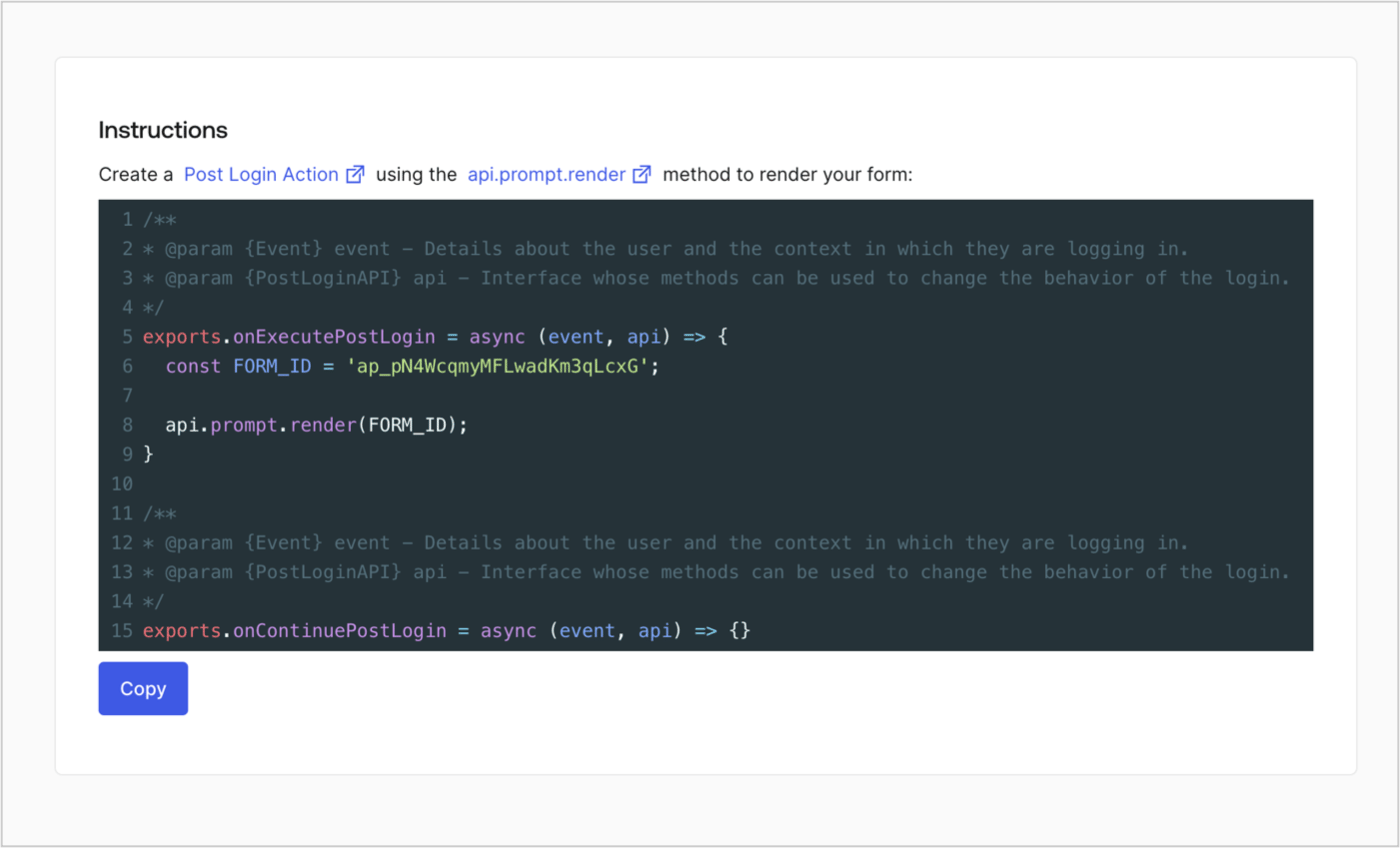
Retrieve your form render code to visually render the form with a custom Post Login Action by following these steps:

* From the Form editor, select **`<> Render`**.
* Select **Copy**.
<Frame>
  <img src="https://mintcdn.com/docs-staging-feat-acl-curated-blocklist/wDgr8I-mFLqdiwoj/docs/images/cdy7uua7fh8z/2EIUzc539sq9lwoTKbjoJv/496a864c0fc44a782c9cadca119dbfb0/embed.png?fit=max&auto=format&n=wDgr8I-mFLqdiwoj&q=85&s=8a7a8a01b89c696f75c759039ea55654" alt="Dashboard > Actions > Forms > Form > Embed" data-og-width="1400" width="1400" data-og-height="848" height="848" data-path="docs/images/cdy7uua7fh8z/2EIUzc539sq9lwoTKbjoJv/496a864c0fc44a782c9cadca119dbfb0/embed.png" data-optimize="true" data-opv="3" srcset="https://mintcdn.com/docs-staging-feat-acl-curated-blocklist/wDgr8I-mFLqdiwoj/docs/images/cdy7uua7fh8z/2EIUzc539sq9lwoTKbjoJv/496a864c0fc44a782c9cadca119dbfb0/embed.png?w=280&fit=max&auto=format&n=wDgr8I-mFLqdiwoj&q=85&s=d54fd70fff9b8a32da3244437f5c62b6 280w, https://mintcdn.com/docs-staging-feat-acl-curated-blocklist/wDgr8I-mFLqdiwoj/docs/images/cdy7uua7fh8z/2EIUzc539sq9lwoTKbjoJv/496a864c0fc44a782c9cadca119dbfb0/embed.png?w=560&fit=max&auto=format&n=wDgr8I-mFLqdiwoj&q=85&s=b149ad1234ce75402aed080a2fa96d7b 560w, https://mintcdn.com/docs-staging-feat-acl-curated-blocklist/wDgr8I-mFLqdiwoj/docs/images/cdy7uua7fh8z/2EIUzc539sq9lwoTKbjoJv/496a864c0fc44a782c9cadca119dbfb0/embed.png?w=840&fit=max&auto=format&n=wDgr8I-mFLqdiwoj&q=85&s=6ba28ca31e6615ea1a4226528b44219b 840w, https://mintcdn.com/docs-staging-feat-acl-curated-blocklist/wDgr8I-mFLqdiwoj/docs/images/cdy7uua7fh8z/2EIUzc539sq9lwoTKbjoJv/496a864c0fc44a782c9cadca119dbfb0/embed.png?w=1100&fit=max&auto=format&n=wDgr8I-mFLqdiwoj&q=85&s=fa268567f5498060b195e20b8fc88e5e 1100w, https://mintcdn.com/docs-staging-feat-acl-curated-blocklist/wDgr8I-mFLqdiwoj/docs/images/cdy7uua7fh8z/2EIUzc539sq9lwoTKbjoJv/496a864c0fc44a782c9cadca119dbfb0/embed.png?w=1650&fit=max&auto=format&n=wDgr8I-mFLqdiwoj&q=85&s=47d6e23f532e2fffdd522a311b11d6bb 1650w, https://mintcdn.com/docs-staging-feat-acl-curated-blocklist/wDgr8I-mFLqdiwoj/docs/images/cdy7uua7fh8z/2EIUzc539sq9lwoTKbjoJv/496a864c0fc44a782c9cadca119dbfb0/embed.png?w=2500&fit=max&auto=format&n=wDgr8I-mFLqdiwoj&q=85&s=484ab277d7623bc17741f7cec6b1061b 2500w" />
</Frame>

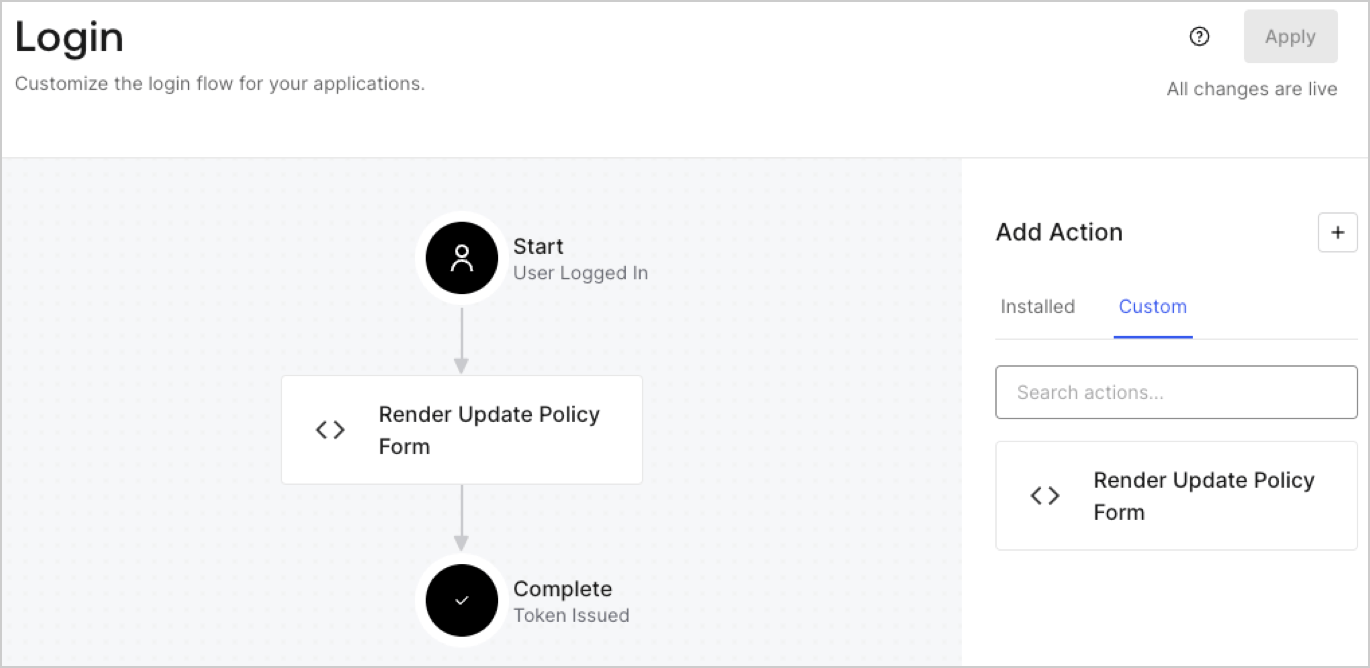
## Create a Post Login Action

Create a post-login Action to render your form by following these steps:

1. Navigate to **Auth0 Dashboard > Actions > Flows > Login.**
2. Select the **+** icon and Select **Build from scratch**:

   * **Name**: Enter `Render Update Policy Form`.
   * **Trigger**: Select `Login / Post Login`.
   * **Runtime**: Select the recommended version.
3. Select **Create**.

To configure the post-login Action:

1. Delete the existing code from the Code editor.
2. Paste the form render code into the Code editor.
3. Edit the code to define the conditional logic that will render the form.

   ```javascript lines theme={null}
   /**
   * @param {Event} event - Details about the user and the context in which they are logging in.
   * @param {PostLoginAPI} api - Interface whose methods can be used to change the behavior of the login.
   */
   exports.onExecutePostLogin = async (event, api) => {
     const FORM_ID = 'REPLACE_WITH_YOUR_FORM_ID';

     if (event.user.app_metadata.privacy_policies !== true) {
       api.prompt.render(FORM_ID);
     }
   }

   exports.onContinuePostLogin = async (event, api) => { }
   ```

   <Callout icon="file-lines" color="#0EA5E9" iconType="regular">
     The example code above will render the form when a user is missing the app metadata `privacy_policies` property.
   </Callout>
4. Select **Deploy.**
5. Drag and Drop the **Render Update Policy Form** Action to the **Login** flow.
   <Frame>
     <img src="https://mintcdn.com/docs-staging-feat-acl-curated-blocklist/zjjpXUUD6Sunyjve/docs/images/cdy7uua7fh8z/5TOwDgevZsBqd7yZynUYWU/41ca909dc3007aed4f40ff794a05efa5/postlogin.png?fit=max&auto=format&n=zjjpXUUD6Sunyjve&q=85&s=4f2273f1b1f36c80f3f86839c7531f24" alt="Dashboard > Forms > Use Case > Render update policy form login action" data-og-width="1370" width="1370" data-og-height="668" height="668" data-path="docs/images/cdy7uua7fh8z/5TOwDgevZsBqd7yZynUYWU/41ca909dc3007aed4f40ff794a05efa5/postlogin.png" data-optimize="true" data-opv="3" srcset="https://mintcdn.com/docs-staging-feat-acl-curated-blocklist/zjjpXUUD6Sunyjve/docs/images/cdy7uua7fh8z/5TOwDgevZsBqd7yZynUYWU/41ca909dc3007aed4f40ff794a05efa5/postlogin.png?w=280&fit=max&auto=format&n=zjjpXUUD6Sunyjve&q=85&s=20aa3c7f9cd1e2ecc5876341e96e9de5 280w, https://mintcdn.com/docs-staging-feat-acl-curated-blocklist/zjjpXUUD6Sunyjve/docs/images/cdy7uua7fh8z/5TOwDgevZsBqd7yZynUYWU/41ca909dc3007aed4f40ff794a05efa5/postlogin.png?w=560&fit=max&auto=format&n=zjjpXUUD6Sunyjve&q=85&s=57a111afec82b9c8ac35b549fe759da1 560w, https://mintcdn.com/docs-staging-feat-acl-curated-blocklist/zjjpXUUD6Sunyjve/docs/images/cdy7uua7fh8z/5TOwDgevZsBqd7yZynUYWU/41ca909dc3007aed4f40ff794a05efa5/postlogin.png?w=840&fit=max&auto=format&n=zjjpXUUD6Sunyjve&q=85&s=7faa11caa5f0a3036a90a6491f96b0a6 840w, https://mintcdn.com/docs-staging-feat-acl-curated-blocklist/zjjpXUUD6Sunyjve/docs/images/cdy7uua7fh8z/5TOwDgevZsBqd7yZynUYWU/41ca909dc3007aed4f40ff794a05efa5/postlogin.png?w=1100&fit=max&auto=format&n=zjjpXUUD6Sunyjve&q=85&s=b2714b57b58f75ecf47ec6b301208d92 1100w, https://mintcdn.com/docs-staging-feat-acl-curated-blocklist/zjjpXUUD6Sunyjve/docs/images/cdy7uua7fh8z/5TOwDgevZsBqd7yZynUYWU/41ca909dc3007aed4f40ff794a05efa5/postlogin.png?w=1650&fit=max&auto=format&n=zjjpXUUD6Sunyjve&q=85&s=bf6ad5982feb517c425c6c0658f67233 1650w, https://mintcdn.com/docs-staging-feat-acl-curated-blocklist/zjjpXUUD6Sunyjve/docs/images/cdy7uua7fh8z/5TOwDgevZsBqd7yZynUYWU/41ca909dc3007aed4f40ff794a05efa5/postlogin.png?w=2500&fit=max&auto=format&n=zjjpXUUD6Sunyjve&q=85&s=6b5f90dad1e5b0eb2d61e6f958177708 2500w" />
   </Frame>
6. Select **Apply.**

### Test implementation

Test the implementation by following these steps:

1. Log in with an existing user whose app`_metadata` attribute `privacy_policies` does not have a value.
2. The post-login Action in the Login flow will render the form and prompt for acceptance.
3. Select **Auth0 Dashboard > User Management > Users,** locate the user and verify that the `app_metadata` attribute `privacy_policies` contains a `true` value and a timestamp.
